Alarm.com - Add an Access Control Access Plan
Before a user can be granted access to a door, they must be a part of an Access Plan. Access Plans can be created from the User Access section of the Alarm.com Customer website or Customer app.
An Access Plan consists of the following:
Timetable
Select the times the users in the plan can be granted entry to an access control door.
Note: Timetables can contain a maximum of 12 time blocks.
Access Points
Select which doors will be part of the Access Plan. You will also see the option to include panel or partition access as well as Z-Wave locks.
Users
Select which users will be allowed access to which access points and when.
Note: If a security panel is included in the access plan, the number of users will be limited by the number of user codes the panel is capable of storing. For more information, see User code compatibility by panel.
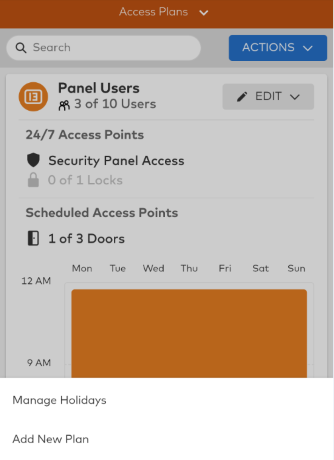
Example Access Plan configuration:

Note: To view a list of all Access Plans, click  using the Customer website or tap Actions, then List Layout using the Customer app.
To add an Access Plan using the Customer website:
- Log in to the Customer website.
- Click User Access.
- Click Add New Plan.
- Select an icon and enter a name for the Access Plan, then click Next.
- Click Add Users.
- Select which users to add to the plan, then click Save.
- Click Add Access Points.
- Select which Access Points to include in the plan, then click Save.
- Click Add Schedule.
- Select a schedule to apply to the plan, then click Save.
- Review the finalized Access Plan, then click Save.
To add an Access Plan using the Customer app:
- Log in to the Customer app.
- Tap
 .
. - Tap User Access.
- Tap Actions, then select Add New Plan.
- Select an icon and enter a name for the Access Plan, then tap Next.
- Tap Add Users.
- Select which users to add to the plan, then tap Save.
- Tap Add Access Points.
- Select which Access Points to include in the plan, then tap Save.
- Tap Add Schedule.
- Select a schedule to apply to the plan, then tap Save.
- Review the finalized Access Plan, then tap Save.